User research ensures your Documentation reflects how people actually think, work, and struggle - so your docs help users succeed, not just understand. Remember: documentation is only successful if it works for real users - not if it’s merely correct.
Without research, docs tend to:
- Skip steps that feel “obvious”
- Assume background knowledge
- Use internal terminology
User research exposes:
- Where users get confused
- What concepts need more explanation
- Which steps are actually non-obvious
Data sources:
- User interviews or surveys
- Support tickets / FAQs
- Analytics (pages visited, common drop-offs)
- Observing users using your product
- Your own experience (if you are part of the target group)
You can condense user research into:
- User Personas
- User Stories
- User Journey Maps
Note
You cannot meet every user’s needs, so it is recommended to prioritize the users that are most important to the product or business.
User Personas
A user persona is a fictional character that represents the ideal user/reader. To build a persona, compile a list of essential characteristics:
- Name
- Age range
- Role (developer, administrator)
- Skill level (beginner, intermediate, expert)
- Context of use (work, hobby, study, time pressure)
User Persona template by Konrad:

User Stories
User stories are short written summaries of what a user is trying to achieve and what they need to do so.
Template:
As a [type of users], I want [activity] so that I can [goal].
Example:
As a developer, I want to integrate SAP data with my smartphone so that I can maintain customer master data or sales order when on the road, visiting customer.
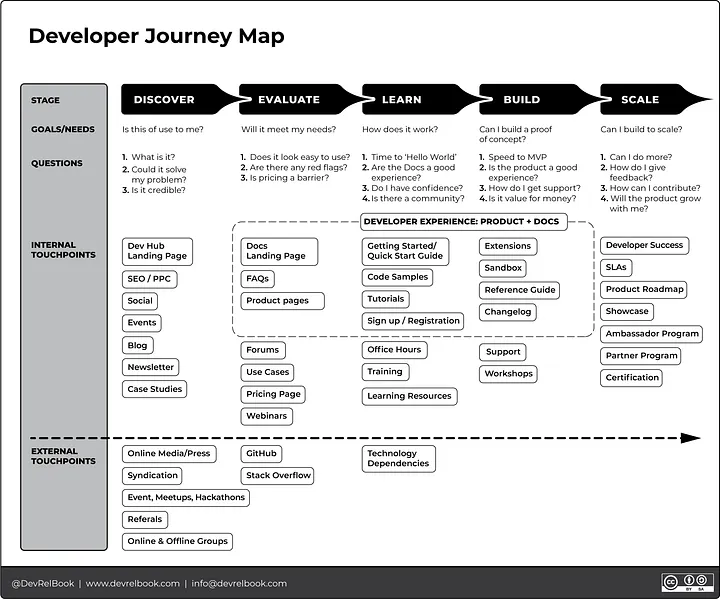
User Journey Maps
A user journey map is a diagram showing the path a user takes through a product while trying to accomlish a task. User journey maps are a cummulation of Friction Logs.
To create a user journey (according to “Docs for Developers”):
- Define a task.
- List the channels a user may interact with, e.g., websites, docs, the app itself.
- List all steps a user takes through each channel, e.g., discover, sing up, install, configure, test, run, review).
- List the user experience for each step, e.g., what they do, feel, think.
- Connect the channels, steps and experiences in a flow.
Example:
Tip
There are template for user personas and user journey maps in Miro.